ProductsEngineering IntelligenceAlways-on DevEx
A DevEx survey only works if people actually answer.
Regentis makes responding effortless and acts on what it hears — so participation stays high and the signal holds up. The artifact is a live picture of developer experience: participation, sentiment by category, and trend lines.
The same day, run twice.
Here is the Tuesday someone asks “how are the engineers doing?” — once as it goes today, once with Always-on DevEx switched on.
Leadership asks how the platform migration is landing with engineers. Your freshest data point is a survey from one quarter ago.
COSTS · steering on stale dataYou open DevEx Panorama: participation, sentiment by category, and this week’s trend — current as of this morning.
INSTEAD · current signal, one viewYou start drafting a survey to find out — thirty questions, a comms plan, team-lead reminders, and weeks until results.
COSTS · weeks until an answerThis week’s pulse already asked one question on exactly this category; answers arrived in one click from email.
INSTEAD · asked, answered, in-flowAn engineer replies-all: “nothing changed after the last survey — why bother?” You watch next quarter’s response rate die in advance.
COSTS · trust, and next quarter’s signalThe category signal is routed into action, visibly — people keep answering because their last answer did something.
INSTEAD · follow-through people can seeParticipation isn’t a personality trait — it’s a design choice.
Ask one question, in the flow of work, and act on the answer.
- The trigger — a pulse goes out on your schedule.Regentis sends a single-question pulse from one of 13 DevEx categories — recurring or one-time, to the teams you choose.
- The work — answering takes one click from email.No portal, no login, no form: the response is recorded the moment it’s clicked, and Regentis tracks participation and categorizes sentiment as answers arrive. Responses aggregate at team level — never scored per person.
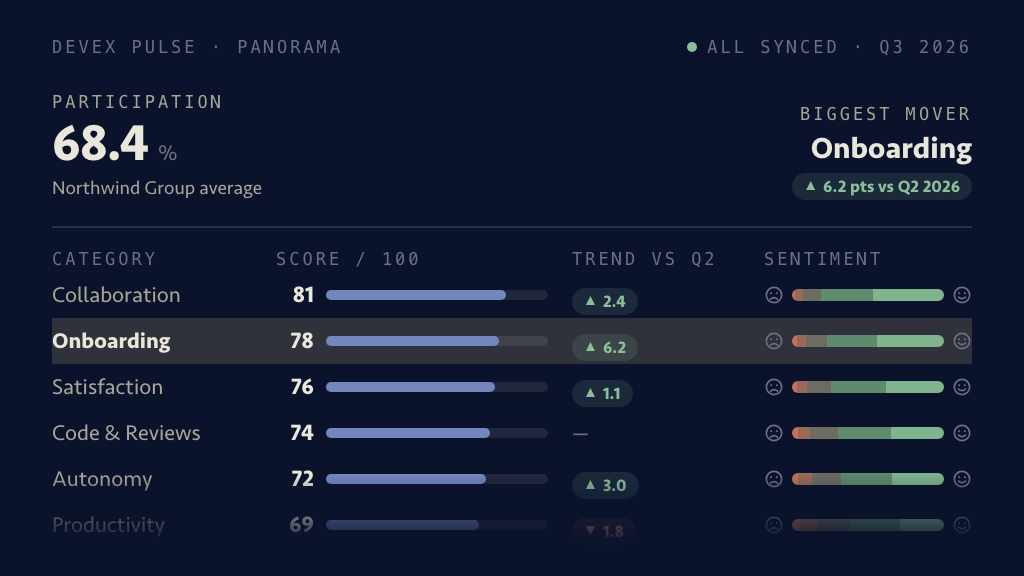
- The artifact — the Panorama updates, and the signal routes.Participation, sentiment by category, trend lines, and the teams × categories grid — with AI snapshots per team, group, or org, and the finding routed to whoever owns that category.
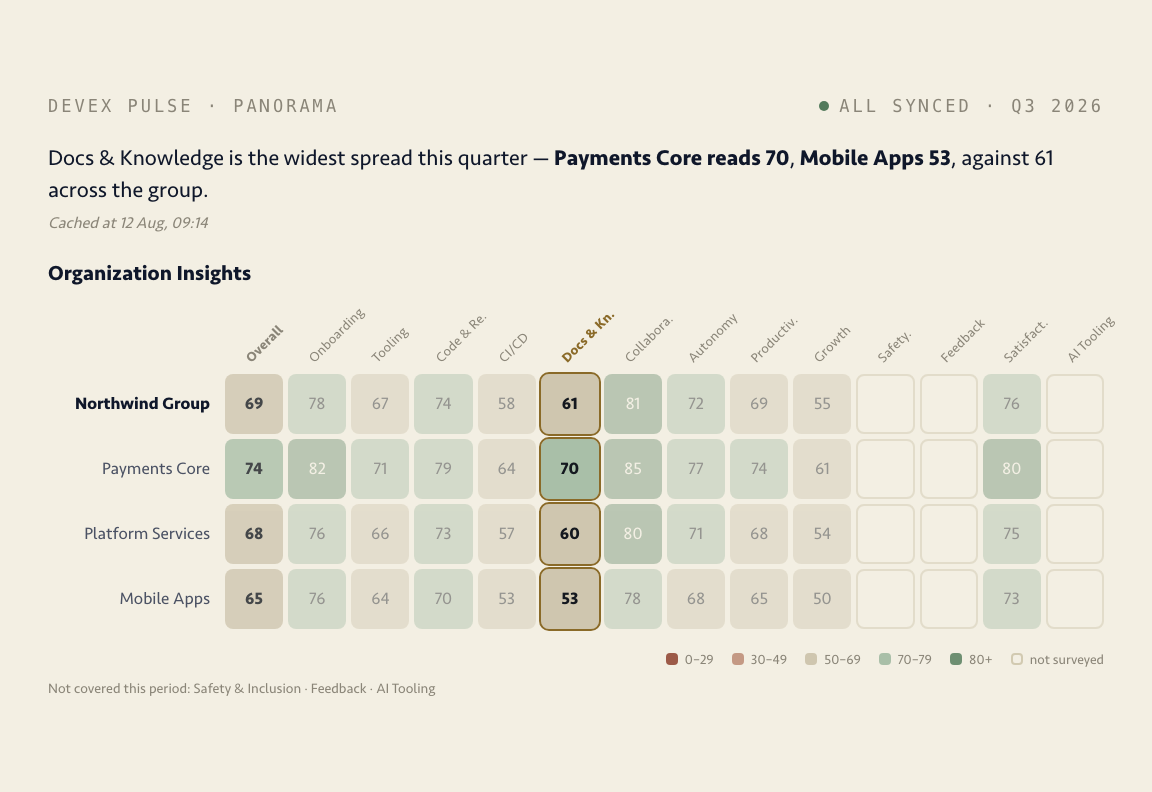
A live picture, not a quarterly PDF.
Participation, sentiment by category, trend lines, and the teams × categories score grid — always current, and ready when a leadership review asks how the org is actually doing.
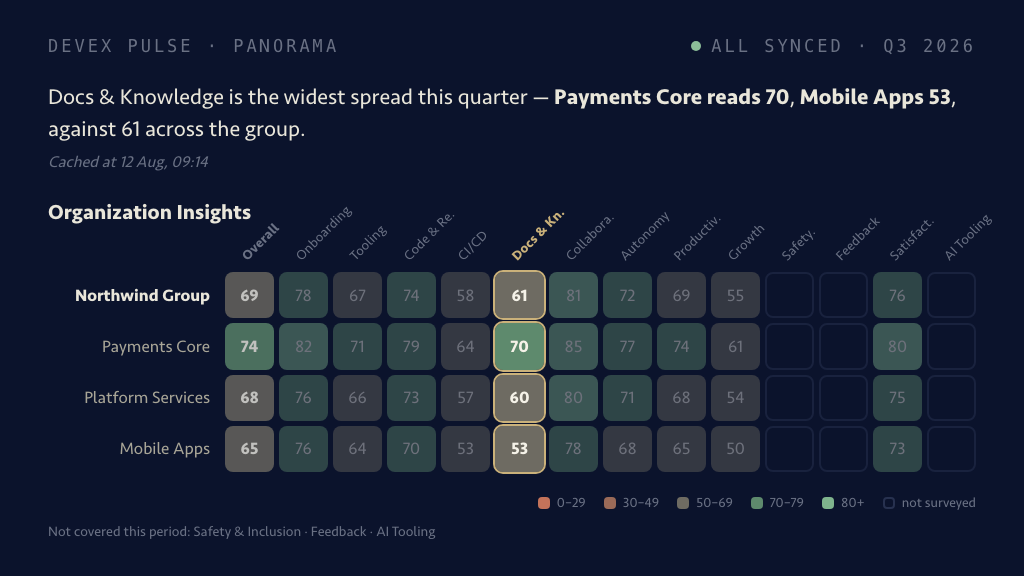
What one category’s answers are saying, team by team, with an AI snapshot of the window you pick — it arrives as the answers do, not at quarter end.
Fair questions, answered plainly.
Our last survey got a dismal response rate. Why would this be different? +
Because the fatigue was rational: long forms, months between rounds, and nothing visibly changing afterward. Regentis changes the mechanics — one question, answered in one click from the inbox, on an always-on cadence — and routes what it hears into visible action, which is what keeps people answering the next pulse.
What does a single-question survey actually look like? +
An email with one question from one of 13 developer-experience categories and one-click answer options — no login, no portal, no form. You choose the cadence (recurring or one-time) and the audience (org, group, or team), and the response is recorded the moment it’s clicked.
Will engineers feel surveilled? +
A fair question for this whole category. Survey responses aggregate by team and category — there are no individual scores anywhere in Regentis, as policy. The point is to measure how the system feels to the people in it, not to grade the people.
Is one question at a time enough signal to steer with? +
A single pulse isn’t — and it doesn’t claim to be. The signal compounds: 13 categories rotating on an always-on cadence build participation, sentiment, and trend lines that a quarterly snapshot can’t, and the Panorama is where they add up. If what you need is a one-off deep-dive research instrument, run that too — this replaces the ritual, not the research.
The next pulse can go out tomorrow morning.
Pick a category, choose the teams, and the first one-click answers land in the Panorama the same day.